How to Bulk Edit Alt Text in WordPress
From 600 missing alts to a clean library, without opening images one by one.
WordPress has no built-in way to bulk edit alt text: the media library makes you open images one at a time. To bulk edit alt text in WordPress, install a free plugin like Filikod. It audits your library, filters images by issue (missing, generic, duplicate) and lets you edit every alt from a single list.
Why one-by-one editing fails
A modest site holds 500 images. Opening each attachment, writing an alt and saving takes 30 seconds on a good day. That is four hours of clicking, which is why most libraries never get fixed.
The backlog is real: across the 2,449 images of our benchmark, 25.2% have no alt text at all.
The three ways to bulk edit alt text
Each method trades speed against control. Here is what you actually sign up for.
Direct SQL
Free and instant, straight in the database. There is no undo, no review, and you are one wrong JOIN away from damaged metadata. Your editors never see what changed.
AI generators
Fast at scale, but they run on paid credits and your images travel to an external API. The output still needs review: generic descriptions are common.
An audit-first plugin
Scan the whole library, filter by issue and fix in bulk with a human eye on every line. Slower than blind generation, and the result actually describes your images.
images in our audit dataset
have no alt text at all
audits behind the numbers
Bulk editing with Filikod
The whole workflow happens in your WordPress admin. Nothing to export, nothing to upload.
Install the plugin
Filikod is free on WordPress.org, with no credits and no account. Activate it and open the dashboard.
Let the audit run
Every image in the library gets classified: missing, generic, duplicate, too short, too long or correct.
Filter by issue
Start with the missing category, it is the biggest win for accessibility and SEO alike.
Edit inline
Write your alts from a single list, no page reloads. Keep our alt text examples open in a tab if you hesitate on phrasing.
Watch your score climb
The ALT Quality Score updates as you fix. If your file names are descriptive, optional local generation can draft a starting point for you to review.
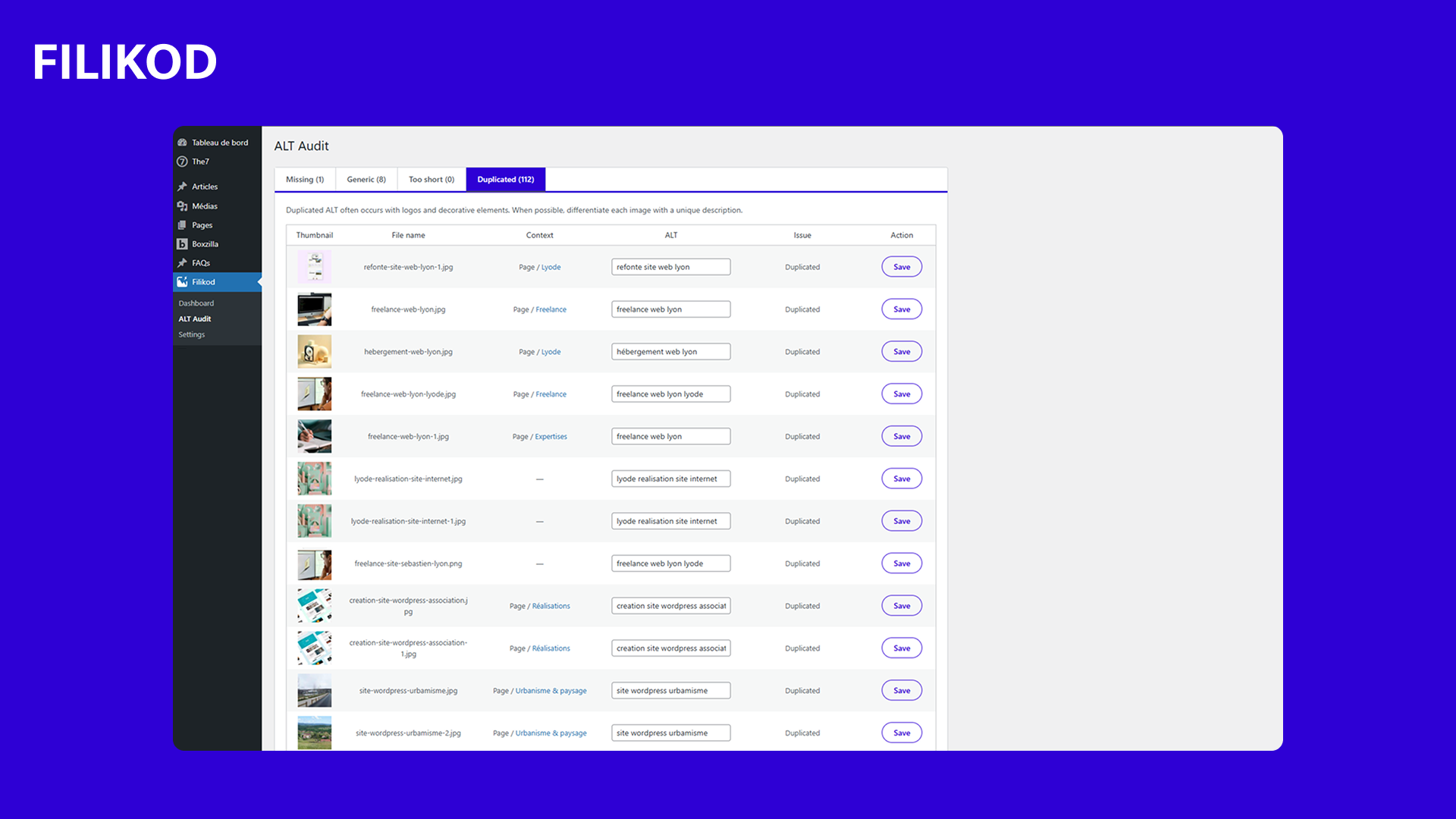
Hundreds of images, one list
The bulk view shows each image next to its current alt and its status. You fix, you save, you move to the next line, and the score follows in real time.
Not sure how bad your library is? Run the free checker first, it works before you install anything.
Frequently asked questions
Only by editing the database directly with SQL, which is risky, invisible to your editors and easy to get wrong on serialized data. The media library interface itself has no bulk alt editing.
Install Filikod, let the audit run, then filter by issue type and edit inline from a single list. Hundreds of images can be handled in one sitting.
Filikod is free on WordPress.org, with no credits and no account. Bulk editing is included, it is not held behind a paid tier.
It updates the media library, which audits and future insertions read from. Images whose alt was hard-copied into old post content keep their embedded value.
Another question?
The full FAQ covers the checker, the score, the plugin and how your data is handled.
Four hours of clicking, or one sitting
Install Filikod, filter by issue and edit from a single list. The plugin is free and bulk editing is included.

Alt text audit and bulk management for WordPress. Quality score, bulk fixing, accessibility. Built in France by Lyode.
★★★★★ 5/5 on WordPress.org
Resources
© 2026 Filikod — WordPress plugin licensed under GPLv2.
EN / FR